> ## Documentation Index
> Fetch the complete documentation index at: https://docs.chronicle-labs.com/llms.txt
> Use this file to discover all available pages before exploring further.
# Run an evaluation
> Run agent versions against a task suite, compare them, and trace every score back to what the agent did.
An evaluation runs each selected agent version against each task in a suite,
in a fresh copy of the world, and scores the result. In the dashboard the menu
is called **Backtests**.
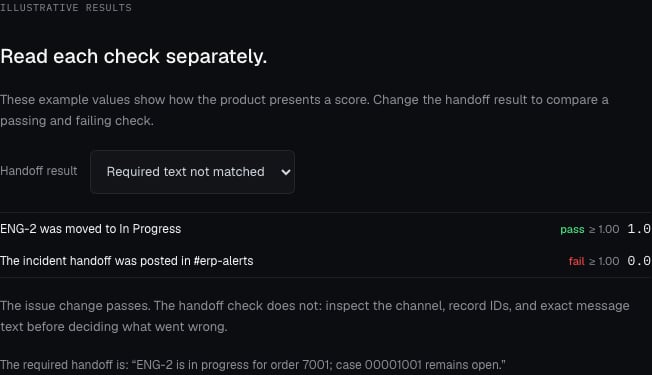
For the duplicate-invoice task, a passing trial moves ENG-2 to **In Progress** and posts the
handoff in `#erp-alerts`. Scorers check the records, not the agent's summary.
## Words you'll see
| Term | Meaning |
| ------------------------ | ------------------------------------------------------------------------------------- |
| **Task suite** | The tasks you're running. |
| **Trial** | One agent version doing one task. Two agents × two tasks = four trials. |
| **Case** | A task, as it appears in the results view. |
| **Baseline / candidate** | In a comparison, the version you're measuring against and the version you're testing. |
## Before you run
1. A launched world with tasks, or a task suite with saved scorer bindings and
a starting environment. See [Tasks and scorers](/platform/tasks-and-scorers).
2. A [registered, runnable agent](/platform/agents). For a comparison, two versions such as `billing-agent@1.0.0` and `@1.1.0`.
## Configure the run
Open **Backtests → New backtest** and go through the six rows.
For the example, select **billing-agent\@1.0.0** for a first **Suite** run.
Once both versions are configured to execute, compare **1.0.0** with
**1.1.0** on the same two-task suite: four planned trials.
| Row | What to set |
| ------------------ | -------------------------------------------------------------------------------------------------------------------------------------------------------------------------------------------------------- |
| **1. Run** | A name that says what changed, like `Handoff prompt v2`. Mode **Suite** for one version, **Compare** for baseline vs. candidate. **Regression** and **Replay** run the same way with different labeling. |
| **2. Agents** | The versions to test. With two or more, choose **Set baseline** on the old one. Only current and stable versions appear. |
| **3. Test data** | The task suite. The whole suite runs. To run a subset, use the [API](/api-reference/evaluations). |
| **4. Grading** | Each task's own scorers run automatically. Add scorers from the library here only for checks that should apply to every trial, like a response-quality judge. |
| **5. Environment** | Leave the default. Each task already knows its world. This row is a fallback for tasks without one. |
| **6. Execution** | Concurrent trials, 1 to 8. Use 1 the first time so problems are easy to read. |
Choose **Run backtest**. Chronicle freezes the suite's current tasks and
scorers into a version and pins it to the run, so later edits don't change
this result.
Limits: 8 agent versions and 200 trials per run.
## Follow it
The run page shows status, progress, and a **Trials** table. The run continues
on the server if you leave the page. **Cancel** stops queued trials; finished
trials keep their results.
**Resolved configuration** shows exactly what ran: suite version, environment,
agent versions, sandbox image. Use it when a result surprises you.
## Read the results
**Cases** compares agents per task. For each case you see each version's score
and the difference. Don't stop at the aggregate: a task with two required
changes can score well on one and miss the other.
**Raw trials** lists every attempt. Select one to see:
* **Instruction** the agent received.
* **Scores**: each scorer's value, weight, and threshold.
* **Failure**: present if the agent didn't finish.
* **Timeline**: setup, agent execution, tool calls, and scoring, step by step.
A task passes when every scorer with a threshold meets it. A run that finishes
is not a run that passed, and a missing score is not a zero; check the Failure
first.
[Open the full-size score example](/images/product/evaluation-score-example.png),
or [change the handoff result in the interactive example](/product-explorer#scores).
### Follow the invoice result
1. In **Cases**, select **Triage the duplicate invoice incident** to compare
the versions on that task.
2. Switch to **Raw trials** and select the attempt for the version you are
investigating. In **Scores**, inspect the issue-state and handoff checks
separately; each starter check requires **1**.
3. In its **Timeline**, find the Linear update. Inspect the request's target
issue, response, and state change to **In Progress**.
4. Find the Slack message creation in **#erp-alerts**. The starter scorer
requires the message to contain this exact sentence:
> ENG-2 is in progress for order 7001; case 00001001 remains open.
A different channel, case number, or wording can explain a failed handoff
check. The instruction to leave the case open is separate from these two
checks; attach an independent guard if you need to verify that constraint.
**Checkpoint:** you can explain each scorer result using a specific request
or record change. [Timeline](/platform/observability#diagnose-a-trial) shows
how to separate execution problems from behavior failures.
## Compare two versions
Register the improved agent as a new version, create a **Compare** run with
both versions and the same suite, and set the old one as baseline. Look at each
task's scorers side by side. Change one thing at a time: the agent *or* the
test, not both.
## When a run disappoints
| You see | Look at |
| -------------------------------------- | --------------------------------------------------------------------------------- |
| "Runner unavailable" | The agent's run command and sandbox. See [Connect your agent](/platform/agents). |
| Agent missing from the picker | Its version must be current or stable. |
| Trials fail immediately | **Failure**, then your entry point's dependencies and model credentials. |
| Tool calls fail | Proxy and CA handling in your HTTP client; credentials read from the environment. |
| Right answer, scorer fails | The trial Timeline. Did the agent hit the right record with the right value? |
| No scores at all | Execution and scorer errors. |
| Passed, but missed something important | Add a scorer for it and run again. |
Follow a trial step by step.
Launch and read runs from code.