> ## Documentation Index
> Fetch the complete documentation index at: https://docs.chronicle-labs.com/llms.txt
> Use this file to discover all available pages before exploring further.

# Timeline

> See every request, change, and score. Turn what you find into the next test.

export const timelineExplorerAsset = "/assets/timeline-explorer-65a518f0a251.json";

export const ProductExplorer = ({source, variant = "world"}) => {
  const timeline = variant === "timeline";
  const [html, setHtml] = useState(null);
  const [loading, setLoading] = useState(false);
  const [error, setError] = useState(null);
  const [height, setHeight] = useState(840);
  const frame = useRef(null);
  const request = useRef(null);
  const initialized = useRef(false);
  const sendContext = useCallback(() => {
    const target = frame.current?.contentWindow;
    if (!target) return;
    target.postMessage({
      type: "chronicle-demo-theme",
      dark: document.documentElement.classList.contains("dark")
    }, "*");
    if (!timeline) {
      const views = {
        "#company": "overview",
        "#overview": "overview",
        "#timeline": "timeline",
        "#twins": "twins",
        "#connected-records": "twins",
        "#tasks": "tasks",
        "#agent-task": "task",
        "#scores": "scores"
      };
      target.postMessage({
        type: "chronicle-demo-view",
        view: views[window.location.hash] || "overview"
      }, "*");
    }
  }, [timeline]);
  const open = async () => {
    if (loading) return;
    setLoading(true);
    setError(null);
    const controller = new AbortController();
    request.current = controller;
    try {
      const response = await fetch(source, {
        signal: controller.signal
      });
      if (!response.ok) throw new Error("The example could not be loaded. Try again.");
      const content = await response.json();
      if (!content || typeof content !== "object" || Array.isArray(content) || typeof content.html !== "string" || !content.html.startsWith("<!doctype html>")) throw new Error("The example could not be loaded. Try again.");
      if (!controller.signal.aborted) setHtml(content.html);
    } catch (reason) {
      if (!controller.signal.aborted) setError(reason.message || "The example could not be loaded. Try again.");
    } finally {
      if (!controller.signal.aborted) setLoading(false);
    }
  };
  useEffect(() => () => request.current?.abort(), []);
  useEffect(() => {
    if (!html) return;
    const updateTheme = () => frame.current?.contentWindow?.postMessage({
      type: "chronicle-demo-theme",
      dark: document.documentElement.classList.contains("dark")
    }, "*");
    const resize = event => {
      if (event.source !== frame.current?.contentWindow) return;
      if (event.data?.type === "chronicle-demo-ready") {
        sendContext();
        return;
      }
      if (timeline && event.data?.type === "chronicle-demo-open-world" && event.data.view === "twins") {
        window.location.assign("/product-explorer#twins");
        return;
      }
      if (event.data?.type !== "chronicle-demo-size") return;
      if (Number.isFinite(event.data.height)) setHeight(Math.min(2400, Math.max(400, event.data.height + 2)));
      if (!initialized.current && event.data.height > 200) {
        initialized.current = true;
        sendContext();
      }
    };
    window.addEventListener("message", resize);
    window.addEventListener("hashchange", sendContext);
    const observer = new MutationObserver(updateTheme);
    observer.observe(document.documentElement, {
      attributes: true,
      attributeFilter: ["class"]
    });
    frame.current?.focus();
    return () => {
      window.removeEventListener("message", resize);
      window.removeEventListener("hashchange", sendContext);
      observer.disconnect();
    };
  }, [html, sendContext, timeline]);
  return <div className="chronicle-product-explorer not-prose">
      {!timeline ? <>
      <span id="company" className="chronicle-explorer-anchor" />
      <span id="overview" className="chronicle-explorer-anchor" />
      <span id="timeline" className="chronicle-explorer-anchor" />
      <span id="twins" className="chronicle-explorer-anchor" />
      <span id="tasks" className="chronicle-explorer-anchor" />
      <span id="connected-records" className="chronicle-explorer-anchor" />
      <span id="agent-task" className="chronicle-explorer-anchor" />
      <span id="scores" className="chronicle-explorer-anchor" />
      </> : null}
      {html ? <iframe ref={frame} title={timeline ? "Interactive Timeline: recorded requests and state changes" : "Worldsmith interactive example: overview, timeline, twins, and tasks"} srcDoc={html} sandbox="allow-scripts" style={{
    height
  }} onLoad={sendContext} /> : <div className="chronicle-explorer-start">
          <p className="chronicle-explorer-eyebrow">{timeline ? "EXPLORE THE TIMELINE" : "EXPLORE WORLDSMITH"}</p>
          <h3>{timeline ? "Follow a request to its changes." : "Explore a simulated system."}</h3>
          <p>{timeline ? "Filter recorded events, inspect a request, and compare the record before and after." : "Open the Worldsmith workspace, inspect recorded activity, and explore twins, tasks, and scorers."}</p>
          <button type="button" onClick={open} disabled={loading}>{loading ? "Loading example…" : error ? "Retry loading example" : timeline ? "Open interactive Timeline" : "Open interactive example"} <span aria-hidden="true">↗</span></button>
          <p className="chronicle-explorer-note" role="status">{loading ? "Loading the product views." : timeline ? "Recorded local activity. No sign-in required." : "Built-in example data. No sign-in required."}</p>
          {error ? <p role="alert">{error}</p> : null}
        </div>}
    </div>;
};

Timeline is where you find out what actually happened. There are three of
them, for three kinds of activity:

| Where                              | What it shows                                                                       |
| ---------------------------------- | ----------------------------------------------------------------------------------- |
| **Timeline** (main menu)           | Events from your connected tools and your own instrumentation. Real-world activity. |
| **Worldsmith → Timeline**          | Requests and changes in a launched world's twins.                                   |
| **Backtests → a trial → Timeline** | Everything one agent did during one trial, plus scoring.                            |

Debugging an evaluation? [Go to Diagnose a trial](#diagnose-a-trial).
Investigating activity from your real tools? [Connect a tool](#connect-a-tool).

## What you're looking at

* **Event:** something that happened in a connected tool or your app, such as
  a customer reporting duplicate invoice lines.
* **Trace and spans:** related steps and their timing, such as looking up an
  order, opening a case, and calling a tool.
* **Request:** one API call to a twin, with its response.
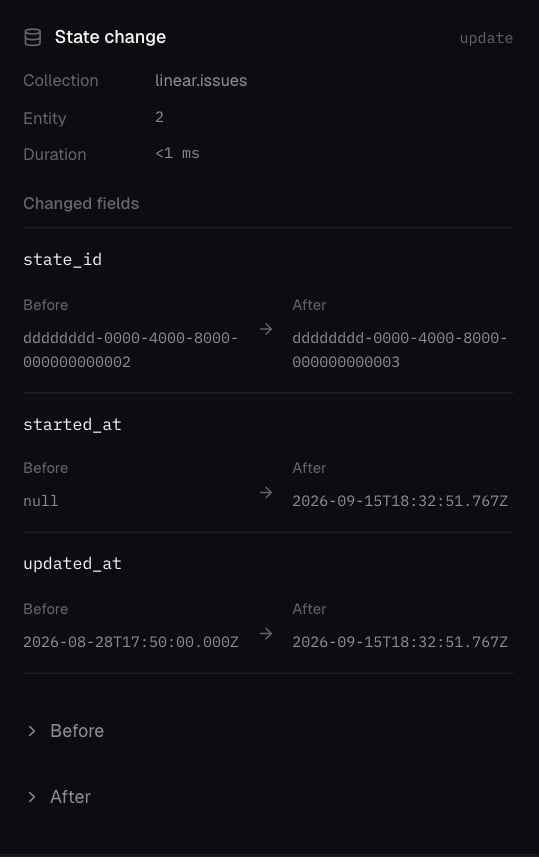
* **Mutation:** the record change, including before and after—for example,
  ENG-2 moving from Todo to In Progress.
* **Score:** a scorer's verdict on one trial, such as issue check passed and
  handoff check failed.

A request shows the agent tried. A mutation shows the service changed. A score
shows whether that was what the task wanted.

## Get real activity in

### Connect a tool

**Connections → Add connection**, pick a source, and authorize it. Activity
appears in Timeline as it happens. If the connection is healthy but an event
you expect is missing, check you connected the right account and that the
activity actually occurred.

### Instrument your app or agent

| Send                                          | How                                                                                     |
| --------------------------------------------- | --------------------------------------------------------------------------------------- |
| Events (a fact: source, topic, type, payload) | Send events with the [Events API](/api-reference/telemetry).                            |
| Traces and spans                              | Use SDK trace ingestion or an OpenTelemetry exporter pointed at Chronicle.              |
| Signals (feedback on an event)                | Attach feedback with the [Events API](/api-reference/telemetry).                        |
| Agent runs                                    | Automatic when you use a Chronicle adapter. See [Connect your agent](/platform/agents). |

Give spans clear names (`lookup_invoice`, `update_linear_issue`,
`notify_finance`) and include the IDs your team searches by (order, case). See
the [Events API](/api-reference/telemetry).

Connecting your real Salesforce doesn't populate a test world. Use real
activity to find the cases worth testing; use a world to make them repeatable.

## Investigate real events

Open **Timeline**.

1. Search or filter to the incident.
2. Group by **Topic** to scan categories, or by **Trace** to follow one thread.
3. Select an event for details. **Live** follows now; turn it off and choose **Fit** to inspect a fixed window.
4. Found a useful case? Choose **Add trace** to turn it into a task. See [Tasks and scorers](/platform/tasks-and-scorers).

## Inspect a world

Open the world in **Worldsmith → Timeline**. Group by **Source** for one
service or **Trace** for related calls. Select a request to see its response
and the records it changed; select a mutation to see before and after. **Load
older activity** pages back.

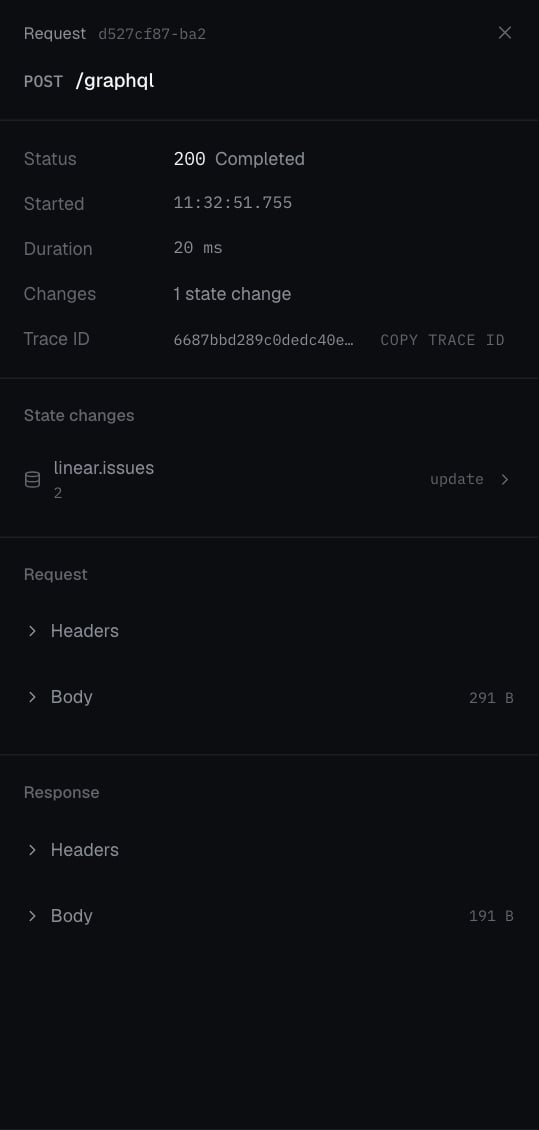
Try it below: expand **Linear**, select the update request, then open its state
change to compare before and after. This recorded local request moved **ENG-2**
from Todo to In Progress; it was not an agent evaluation.

<ProductExplorer source={timelineExplorerAsset} variant="timeline" />

<Accordion title="View the request and state-change screenshots">
  <Tabs>
    <Tab title="Request">
      <Frame caption="A real local API request: POST /graphql completed with HTTP 200 and recorded one state change." className="product-capture">
        <img src="https://mintcdn.com/chroniclelabs-0d363efc/BRuFTKj-kt84RfoY/images/product/worldsmith-request-focused.png?fit=max&auto=format&n=BRuFTKj-kt84RfoY&q=85&s=4eef06cc5e88c5bfce300fdeeac60d64" alt="Request inspector showing POST /graphql, status 200 Completed, and one update to linear.issues." width="539" height="1130" data-path="images/product/worldsmith-request-focused.png" />
      </Frame>

      [Open the request inspector at full size](/images/product/worldsmith-request-focused.png).
    </Tab>

    <Tab title="Record change">
      <Frame caption="The same request changed the issue's stored state_id. In this seed, the ID ending 0002 is Todo and the ID ending 0003 is In Progress, confirmed by the API response." className="product-capture">
        <img src="https://mintcdn.com/chroniclelabs-0d363efc/BRuFTKj-kt84RfoY/images/product/worldsmith-mutation-focused.png?fit=max&auto=format&n=BRuFTKj-kt84RfoY&q=85&s=be54f02ba67c2f30936daa83eb63d16c" alt="State change inspector showing the linear.issues state_id changing from an ID ending 0002 to one ending 0003, plus started_at and updated_at changes." width="539" height="857" data-path="images/product/worldsmith-mutation-focused.png" />
      </Frame>

      [Open the recorded change at full size](/images/product/worldsmith-mutation-focused.png).
    </Tab>
  </Tabs>
</Accordion>

**Checkpoint:** distinguish a twin lifecycle event such as **running** from
an agent request. Startup events tell you the service is ready; they do not
show that the agent performed the task.

Very large payloads are truncated; the request detail says so when it happens.

## Diagnose a trial

<Steps>
  <Step title="Find the case">
    In the run, open **Cases** and find the task that failed or regressed.
    Look at each scorer, not just the total.
  </Step>

  <Step title="Open the trial">
    Switch to **Raw trials** and select the attempt. Read **Instruction**,
    **Scores**, and **Failure** if present.
  </Step>

  <Step title="Walk the Timeline">
    Follow setup, agent steps, tool calls, and scoring in order. For the
    duplicate-invoice task: did the agent find ENG-2, did it send the update, did it post to
    `#erp-alerts`?
  </Step>

  <Step title="Match the score to the evidence">
    World-state scorers check recorded changes. If the agent says it posted,
    look for the Slack request, its response, and the created message. If
    evidence is missing, check the selected trial, routing, and capture before
    concluding that no action was taken.
  </Step>
</Steps>

| You see                              | Likely cause                                                                                                          |
| ------------------------------------ | --------------------------------------------------------------------------------------------------------------------- |
| Setup fails before the agent runs    | Environment or sandbox problem, not the agent.                                                                        |
| Agent updates the wrong record       | Lookup or instruction ambiguity. Add distinguishing context to the world.                                             |
| Right issue moved, no handoff        | Missing action. Keep separate scorers so this stays visible.                                                          |
| Claims success, no matching mutation | Inspect the request and response. A failed call, no-op, wrong record, or missing capture can explain the gap.         |
| A scorer errors                      | Check its code and inputs. After a library edit, use **Refresh scorer definitions** on the task before running again. |

## Close the loop

Once you understand a failure, add a task from a trace or by hand. Attach and
save scorers for the behavior that broke, then run both agent versions on the
same suite. Starting the evaluation publishes the updated suite version; old
results retain their original test definitions.
