> ## Documentation Index
> Fetch the complete documentation index at: https://docs.chronicle-labs.com/llms.txt
> Use this file to discover all available pages before exploring further.
# Build a world
> Review an example world, launch its service twins, and prepare a task suite for your agent.
Worldsmith builds a **world**: a simulated system with services, data, and state
your agent can interact with. This walkthrough models a company's
duplicate-invoice incident: move **ENG-2** to **In Progress** and notify finance
in **#erp-alerts**.
**Start with the example → Review the checked draft → Launch → Evaluate.**
Checking validates the draft. Launching saves it and starts its service twins.
The agent does its work when you run an evaluation.
In the dashboard, open **Worldsmith** and choose
**Coordinate an order-to-cash rollout**. This loads the built-in company,
connected records, and tasks used below.
 [Open the welcome image](/images/product/worldsmith-welcome-focused.png).
To create a different situation after this walkthrough, use a
[complete brief](/worldsmith/prompting).
In **Overview**, review the company and shared people. In **Twins**, open
**Linear → Issues → ENG-2** and read the duplicate-invoice description.
Check three references in the same incident:
* **SAP order 7001** is the order that was invoiced twice.
* **Salesforce case 00001001** tracks Northwind's open customer case.
* **#erp-alerts** contains the engineering and finance discussion.
[Open the welcome image](/images/product/worldsmith-welcome-focused.png).
To create a different situation after this walkthrough, use a
[complete brief](/worldsmith/prompting).
In **Overview**, review the company and shared people. In **Twins**, open
**Linear → Issues → ENG-2** and read the duplicate-invoice description.
Check three references in the same incident:
* **SAP order 7001** is the order that was invoiced twice.
* **Salesforce case 00001001** tracks Northwind's open customer case.
* **#erp-alerts** contains the engineering and finance discussion.
 [Open the record image](/images/product/worldsmith-record-focused.png), or
[try the world workspace](/product-explorer#twins).
In that example, use **Overview** to inspect people and **Twins**
to expand **Linear → Issues → ENG-2**. Edits there stay in the example.
Wait for **World prepared** in the Worldsmith conversation. Expand its
notes to review any warnings. If you see **A few things need fixing**,
correct the listed records or choose **Fix with Worldsmith**.
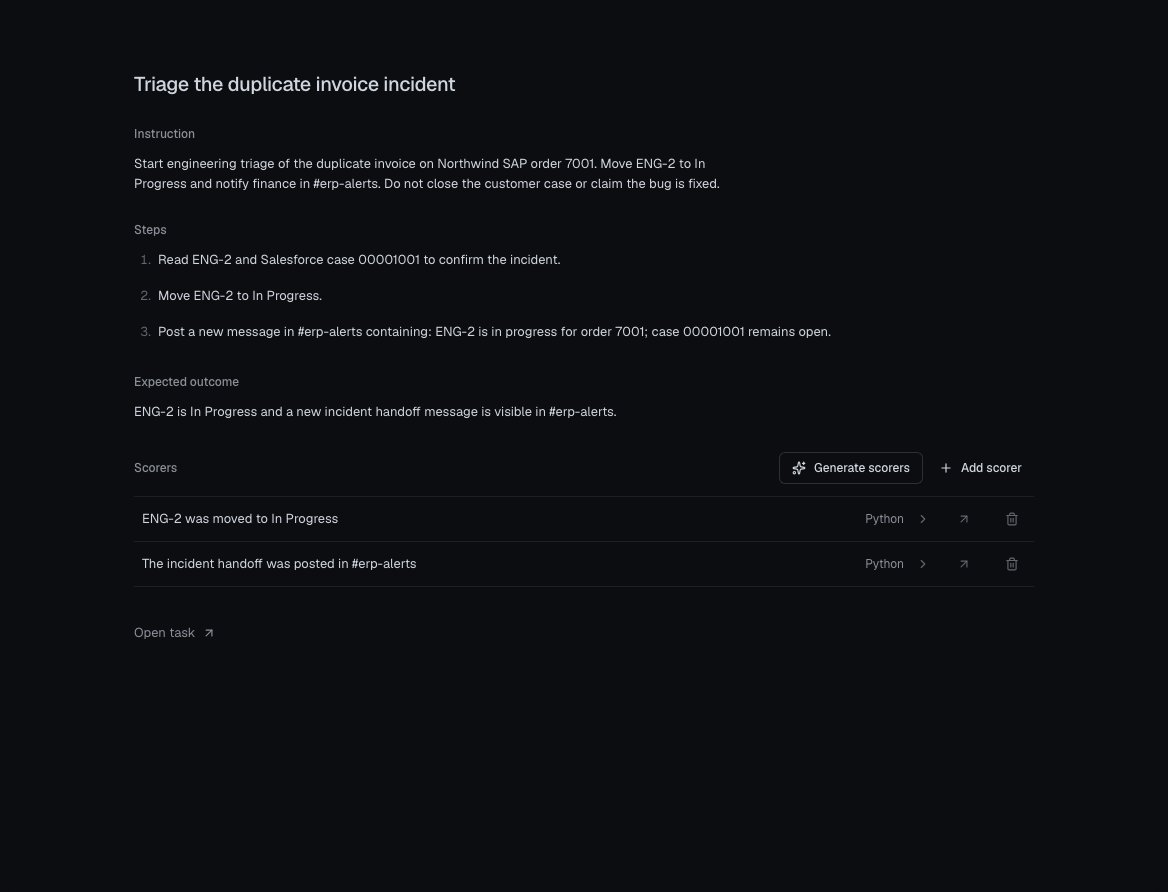
Open **Tasks → Triage the duplicate invoice incident**. Read the
**Instruction**, **Steps**, and **Expected outcome**. The agent must move
ENG-2 to **In Progress** and post a new message in **#erp-alerts** containing
this exact text:
[Open the record image](/images/product/worldsmith-record-focused.png), or
[try the world workspace](/product-explorer#twins).
In that example, use **Overview** to inspect people and **Twins**
to expand **Linear → Issues → ENG-2**. Edits there stay in the example.
Wait for **World prepared** in the Worldsmith conversation. Expand its
notes to review any warnings. If you see **A few things need fixing**,
correct the listed records or choose **Fix with Worldsmith**.
Open **Tasks → Triage the duplicate invoice incident**. Read the
**Instruction**, **Steps**, and **Expected outcome**. The agent must move
ENG-2 to **In Progress** and post a new message in **#erp-alerts** containing
this exact text:
```text theme={null}
ENG-2 is in progress for order 7001; case 00001001 remains open.
```
 [Open the task image](/images/product/worldsmith-task-focused.png), or
[inspect the example task](/product-explorer#agent-task).
Open each scorer. **ENG-2 was moved to In Progress** checks the issue
update. **The incident handoff was posted in #erp-alerts** checks a new
message containing the exact sentence above. Both have a **1.00** pass threshold.
The instruction also says to keep the case open and not claim the bug is
fixed. The two supplied scorers do **not** independently verify those
constraints. To make them affect the score, add checks before launching;
see [grade constraints as well as changes](/worldsmith/prompting#make-success-observable).
Choose **Launch world**. The button becomes available when checking has
finished, there are no problems, and the draft includes at least one service.
Launching saves this world version, starts its twins, and prepares its task
suite and scorers. Confirm both checkpoints:
* In **Twins**, the four services show **Running**. Each running twin has
a base URL and an **API token** for its vendor API.
* In **Tasks**, you see **Saved in Tasks with … scorers** and
**Open task suite**. Task setup finishes separately from twin startup.
If Tasks shows **Create task suite**, **Resume task setup**, or
**Retry task setup**, follow the
[task-setup recovery steps](/worldsmith/troubleshooting#the-world-is-running-but-tasks-are-not-ready).
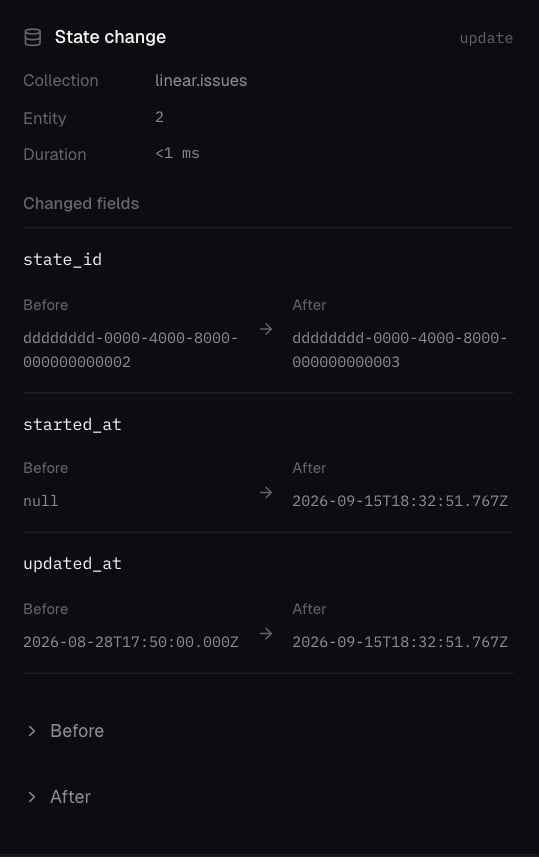
The world's **Timeline** records requests, changes, and lifecycle events
from these twins. Once a request changes a record, select it to inspect the
captured change. See [Timeline and traces](/platform/observability).
[Open the task image](/images/product/worldsmith-task-focused.png), or
[inspect the example task](/product-explorer#agent-task).
Open each scorer. **ENG-2 was moved to In Progress** checks the issue
update. **The incident handoff was posted in #erp-alerts** checks a new
message containing the exact sentence above. Both have a **1.00** pass threshold.
The instruction also says to keep the case open and not claim the bug is
fixed. The two supplied scorers do **not** independently verify those
constraints. To make them affect the score, add checks before launching;
see [grade constraints as well as changes](/worldsmith/prompting#make-success-observable).
Choose **Launch world**. The button becomes available when checking has
finished, there are no problems, and the draft includes at least one service.
Launching saves this world version, starts its twins, and prepares its task
suite and scorers. Confirm both checkpoints:
* In **Twins**, the four services show **Running**. Each running twin has
a base URL and an **API token** for its vendor API.
* In **Tasks**, you see **Saved in Tasks with … scorers** and
**Open task suite**. Task setup finishes separately from twin startup.
If Tasks shows **Create task suite**, **Resume task setup**, or
**Retry task setup**, follow the
[task-setup recovery steps](/worldsmith/troubleshooting#the-world-is-running-but-tasks-are-not-ready).
The world's **Timeline** records requests, changes, and lifecycle events
from these twins. Once a request changes a record, select it to inspect the
captured change. See [Timeline and traces](/platform/observability).
 [Open the recorded change at full size](/images/product/worldsmith-mutation-focused.png).
Choose **Tasks → Open task suite** to review the saved tasks. If this is
your first agent, [register a runnable version](/platform/agents), such as
**billing-agent\@1.0.0**. Then [run the suite in Backtests](/platform/evaluations).
Every trial starts from a fresh copy of the saved world. Inspect the
trial's scores and Timeline to confirm the Linear update and Slack handoff.
Its activity belongs to the trial, separate from the dashboard world's Timeline.
## Refine the next version
Reopen the world with the switcher beside its title. Click an editable field
to change it; edits save to your browser's draft and trigger another check.
For a larger variation, ask Worldsmith:
[Open the recorded change at full size](/images/product/worldsmith-mutation-focused.png).
Choose **Tasks → Open task suite** to review the saved tasks. If this is
your first agent, [register a runnable version](/platform/agents), such as
**billing-agent\@1.0.0**. Then [run the suite in Backtests](/platform/evaluations).
Every trial starts from a fresh copy of the saved world. Inspect the
trial's scores and Timeline to confirm the Linear update and Slack handoff.
Its activity belongs to the trial, separate from the dashboard world's Timeline.
## Refine the next version
Reopen the world with the switcher beside its title. Click an editable field
to change it; edits save to your browser's draft and trigger another check.
For a larger variation, ask Worldsmith:
```text theme={null}
Keep the duplicate-invoice task, existing record keys, and both scorers. Add a similar incident for another customer and an older Slack reply saying the incident was resolved. Add newer evidence that Northwind's case is still open. Keep ENG-2 in Todo and leave the required handoff message for the agent to write.
```
Use **Add twin**, **Remove twin**, or **Restore twin** in **Twins** to change
the services in the next version. Ask Worldsmith to change IDs, handles, or
channel names so related references stay consistent. In **Tasks**, use
**Generate tasks** when there are none, or **Generate scorers** / **Add scorer**
for the selected task.
Choose **Launch version** to save edits as a new version, or **Relaunch** for
a fresh version of the same configuration. The **v1**, **v2** controls open
version history. Earlier versions keep their records and activity.
Draft edits stay in this browser until you launch. They do not change running
twins. Screenshots use the built-in example; worlds generated from your own
briefs can have different records and identifiers.
Define the starting evidence, actions, and checks.
Compile and launch worlds from code.