

Methods
Start a run
You need a task suite ID and one or more agent versions. For a Worldsmith world, the suite ID isworld.evaluation.task_suite_id; wait for
world.evaluation.status to be ready first. Follow Worlds
to obtain world, and connect the named agent version
before submitting. Registration alone does not configure a run command.
Python
Limits: 8 agents and 200 trials per run.
Compare two versions
For a subsequent comparison, registerbilling-agent@1.1.0, configure its run
command, then pass both versions and mode="compare". This starts a new run
on the same suite using the suite_id obtained above.
Python
tasks=[...] with task IDs from tasks.list(task_suite_id).
Wait for it
wait polls until the run is succeeded, failed, or cancelled. The
timeout only stops waiting; the run continues on the server, and you can wait
again with the same ID.
Python
stream yields events as they happen:
trial_started, trial_finished, run_finished.
Python
retrieve to catch up; the run’s state on the
server is the source of truth.
Read the results
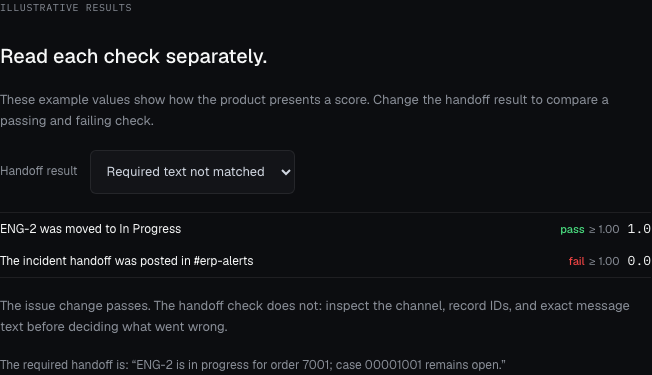
Review the instruction and scorers alongside the result. The task describes the intended work; each trial records the tool actions and the evidence its scorers evaluated.results gives you pass/fail per task. A task passes when every scorer with a
threshold met it in every trial. A run that succeeded can still have failing
tasks: succeeded means the trials ran, not that the agent passed.
Python
task_results covers both agents together. Use trials to see
each agent separately.
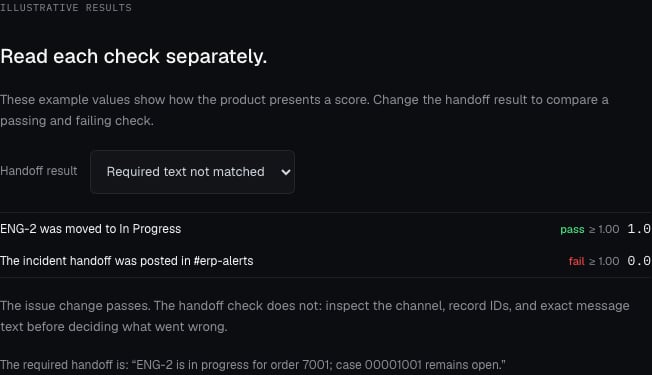
Illustrative scorer results, not an executed evaluation: the issue-state check passes and the required handoff text does not match.
trials and results.
Inspect trials
Each trial has the agent, the task, a status, and a list ofscores, one per
scorer. A trial’s detail adds the instruction it received, its steps
(setup, agent, tool calls, scoring), and any artifacts it produced.
Python
None/null means the scorer didn’t produce one, usually because
the trial errored. Read trial.error before treating it as a zero.
Use results in CI
Continue with therun returned by evaluations.create. The
gate below waits for completion, rejects failed/cancelled runs and empty results,
and checks every task’s passed value. In a comparison, that covers both agents.
Use it in your SDK program with the configured client; let errors produce a
nonzero process exit. In Go, propagate the returned error to main and exit
there, as in the Go example.
Python
Cancel
Python
cancelled.