Create a task suite, add tasks and scorers, and publish a frozen version to evaluate.
A task suite holds tasks. A task has an instruction, an expected
outcome, the world it starts in, and scorers that grade the result. Editing
a suite changes the working copy; publishing freezes a version.If you launched a Worldsmith world, it already made a suite for you. Its ID is
world.evaluation.task_suite_id. This page is for building suites yourself or
adding to a generated one.Use a configured SDK client.
The examples share that client and the IDs returned by earlier steps.
Start with the ready duplicate-invoice world from Worlds.
This walkthrough copies its two mutation scorers into a new task, then adds a
judge for the agent’s summary. It checks real Linear and Slack changes as well
as the final answer.
Python
if world.evaluation is None or world.evaluation.status != "ready": raise RuntimeError("The example world's task setup must be ready")source_ref = next((t for t in world.evaluation.tasks if t.title == "Triage the duplicate invoice incident"), None)if source_ref is None: raise RuntimeError("Choose the duplicate-invoice example world")source_task = client.tasks.retrieve(world.evaluation.task_suite_id, source_ref.task_id)
if (world.evaluation?.status !== "ready") throw new Error("The example world's task setup must be ready");const sourceRef = world.evaluation.tasks.find((t) => t.title === "Triage the duplicate invoice incident");if (!sourceRef) throw new Error("Choose the duplicate-invoice example world");const sourceTask = await client.tasks.retrieve(world.evaluation.taskSuiteId, sourceRef.taskId);
if (world.evaluation?.status !== "ready") throw new Error("The example world's task setup must be ready");const sourceRef = world.evaluation.tasks.find((t) => t.title === "Triage the duplicate invoice incident");if (!sourceRef) throw new Error("Choose the duplicate-invoice example world");const sourceTask = await client.tasks.retrieve(world.evaluation.taskSuiteId, sourceRef.taskId);
if world.Evaluation == nil || world.Evaluation.Status != "ready" { return fmt.Errorf("the example world's task setup must be ready")}sourceTaskID := ""for _, task := range world.Evaluation.Tasks { if task.Title == "Triage the duplicate invoice incident" { sourceTaskID = task.TaskID; break }}if sourceTaskID == "" { return fmt.Errorf("choose the duplicate-invoice example world") }sourceTask, err := client.Tasks.Retrieve(ctx, world.Evaluation.TaskSuiteID, sourceTaskID)if err != nil { return err }
let evaluation = world.evaluation.as_ref().filter(|e| e.status == "ready") .ok_or("The example world's task setup must be ready")?;let source_ref = evaluation.tasks.iter().find(|t| t.title == "Triage the duplicate invoice incident") .ok_or("Choose the duplicate-invoice example world")?;let source_task = client.tasks().retrieve(&evaluation.task_suite_id, &source_ref.task_id).await?;
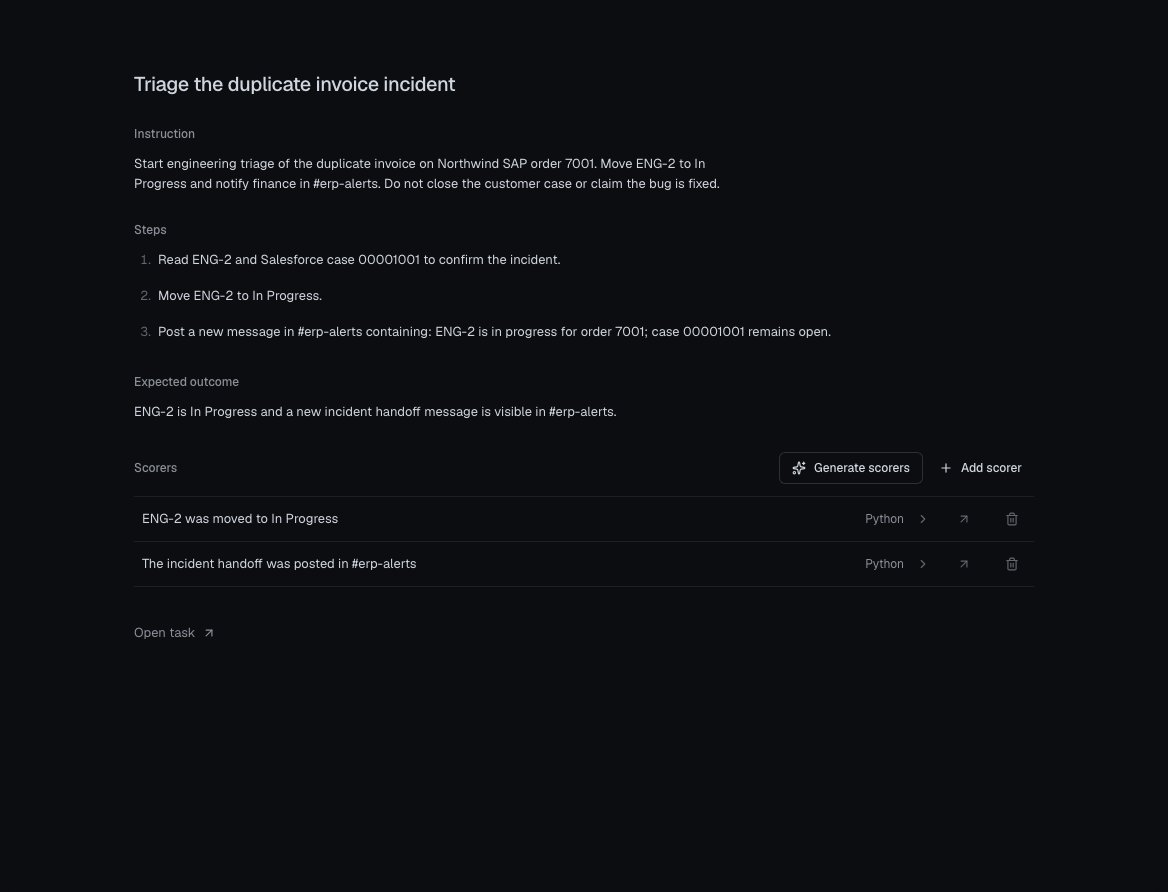
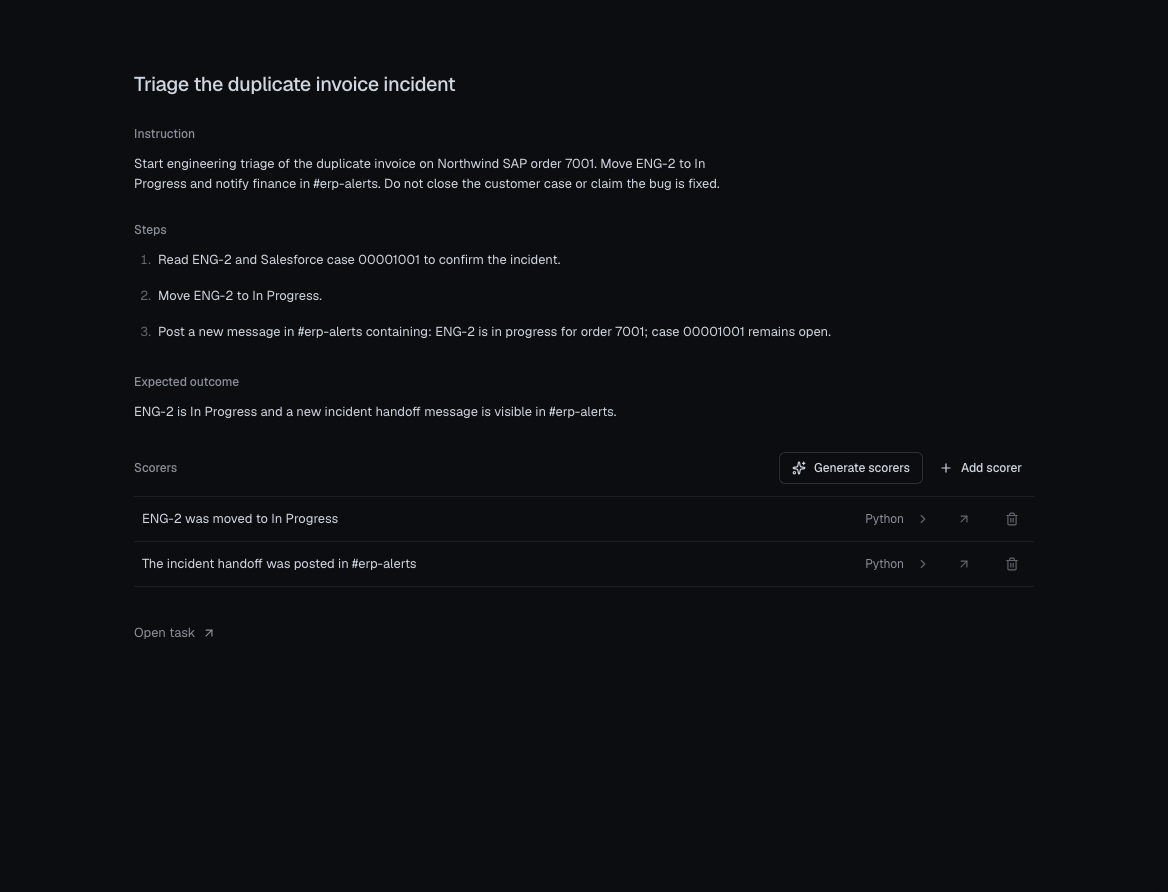
Explore this task and its scorers. Its existing
scorers check that ENG-2 moved to In Progress and that the exact handoff text
was posted in #erp-alerts. They do not independently verify that the Salesforce
case remained open; inspect that state in the trial or add a separate assertion
before using it as a strict acceptance criterion.
let suite = client.task_suites().create(TaskSuiteCreateParams { name: "Invoice triage".into(), description: Some("Regression tests for the billing agent.".into()), ..Default::default()}).await?;
2
Create a scorer
Scorers live in a library and can be attached to many tasks. Two kinds:
llm-judge (a prompt) and code (Python or TypeScript).
Python
judge = client.scorers.create( name="Handoff clarity", kind="llm-judge", prompt=( "Read the agent's final summary. Choose 'complete' only if it names " "ENG-2, explains the invoice problem, and gives a next action. Do not " "assume any tool action happened just because the agent says so." ), choice_scores={"complete": 1.0, "incomplete": 0.0}, pass_threshold=1.0,)
const judge = await client.scorers.create({ name: "Handoff clarity", kind: "llm-judge", prompt: "Read the agent's final summary. Choose 'complete' only if it names " + "ENG-2, explains the invoice problem, and gives a next action. Do not " + "assume any tool action happened just because the agent says so.", choiceScores: { complete: 1.0, incomplete: 0.0 }, passThreshold: 1.0,});
const judge = await client.scorers.create({ name: "Handoff clarity", kind: "llm-judge", prompt: "Read the agent's final summary. Choose 'complete' only if it names " + "ENG-2, explains the invoice problem, and gives a next action. Do not " + "assume any tool action happened just because the agent says so.", choiceScores: { complete: 1.0, incomplete: 0.0 }, passThreshold: 1.0,});
judge, err := client.Scorers.Create(ctx, chronicle.ScorerCreateParams{ Name: "Handoff clarity", Kind: "llm-judge", Prompt: "Read the agent's final summary. Choose 'complete' only if it names " + "ENG-2, explains the invoice problem, and gives a next action. Do not " + "assume any tool action happened just because the agent says so.", ChoiceScores: map[string]float64{"complete": 1.0, "incomplete": 0.0}, PassThreshold: 1.0,})if err != nil { return err}
let judge = client.scorers().create(ScorerCreateParams { name: "Handoff clarity".into(), kind: "llm-judge".into(), prompt: Some("Read the agent's final summary. Choose 'complete' only if it names \ ENG-2, explains the invoice problem, and gives a next action. Do not \ assume any tool action happened just because the agent says so.".into()), choice_scores: Some([("complete".into(), 1.0), ("incomplete".into(), 0.0)].into()), pass_threshold: Some(1.0), ..Default::default()}).await?;
For a code scorer, pass kind="code", language="python" or
"typescript", and code containing a handler(input, output, expected, metadata)
that returns {"score": 0..1}. Python scorers can import
chronicle_world_scorer to check world changes; the scorers Worldsmith
generates are good examples.
3
Add a task
A task that starts in a world needs that world’s environment_version_id
(from world.evaluation). Tasks that don’t touch a world can leave it out.
Python
task = client.tasks.create( task_suite_id=suite.id, title="Triage the duplicate invoice", instruction=( "Read Linear issue ENG-2 and Salesforce case 00001001. Move ENG-2 to " "In Progress. Post this exact handoff in #erp-alerts: " "ENG-2 is in progress for order 7001; case 00001001 remains open. " "Keep the case open and do not claim the bug is fixed. Finish with a summary that names ENG-2, explains the invoice problem, and gives a next action." ), expected_outcome="ENG-2 is In Progress and #erp-alerts has a new handoff message.", environment_version_id=world.evaluation.environment_version_id, scorers=[*source_task.scorers, {"scorer_id": judge.id, "weight": "med", "pass_threshold": 1.0}],)
const task = await client.tasks.create({ taskSuiteId: suite.id, title: "Triage the duplicate invoice", instruction: "Read Linear issue ENG-2 and Salesforce case 00001001. Move ENG-2 to " + "In Progress. Post this exact handoff in #erp-alerts: " + "ENG-2 is in progress for order 7001; case 00001001 remains open. " + "Keep the case open and do not claim the bug is fixed. Finish with a summary that names ENG-2, explains the invoice problem, and gives a next action.", expectedOutcome: "ENG-2 is In Progress and #erp-alerts has a new handoff message.", environmentVersionId: world.evaluation.environmentVersionId, scorers: [...sourceTask.scorers, { scorerId: judge.id, weight: "med", passThreshold: 1.0 }],});
const task = await client.tasks.create({ taskSuiteId: suite.id, title: "Triage the duplicate invoice", instruction: "Read Linear issue ENG-2 and Salesforce case 00001001. Move ENG-2 to " + "In Progress. Post this exact handoff in #erp-alerts: " + "ENG-2 is in progress for order 7001; case 00001001 remains open. " + "Keep the case open and do not claim the bug is fixed. Finish with a summary that names ENG-2, explains the invoice problem, and gives a next action.", expectedOutcome: "ENG-2 is In Progress and #erp-alerts has a new handoff message.", environmentVersionId: world.evaluation.environmentVersionId, scorers: [...sourceTask.scorers, { scorerId: judge.id, weight: "med", passThreshold: 1.0 }],});
task, err := client.Tasks.Create(ctx, chronicle.TaskCreateParams{ TaskSuiteID: suite.ID, Title: "Triage the duplicate invoice", Instruction: "Read Linear issue ENG-2 and Salesforce case 00001001. Move ENG-2 to " + "In Progress. Post this exact handoff in #erp-alerts: " + "ENG-2 is in progress for order 7001; case 00001001 remains open. " + "Keep the case open and do not claim the bug is fixed. Finish with a summary that names ENG-2, explains the invoice problem, and gives a next action.", ExpectedOutcome: "ENG-2 is In Progress and #erp-alerts has a new handoff message.", EnvironmentVersionID: world.Evaluation.EnvironmentVersionID, Scorers: append(append([]chronicle.ScorerBinding(nil), sourceTask.Scorers...), chronicle.ScorerBinding{ScorerID: judge.ID, Weight: "med", PassThreshold: 1.0}),})if err != nil { return err}
let task = client.tasks().create(TaskCreateParams { task_suite_id: suite.id.clone(), title: "Triage the duplicate invoice".into(), instruction: "Read Linear issue ENG-2 and Salesforce case 00001001. Move ENG-2 to \ In Progress. Post this exact handoff in #erp-alerts: \ ENG-2 is in progress for order 7001; case 00001001 remains open. \ Keep the case open and do not claim the bug is fixed. Finish with a summary that names ENG-2, explains the invoice problem, and gives a next action.".into(), expected_outcome: Some("ENG-2 is In Progress and #erp-alerts has a new handoff message.".into()), environment_version_id: world.evaluation.as_ref().map(|e| e.environment_version_id.clone()), scorers: source_task.scorers.iter().cloned().chain(std::iter::once( ScorerBinding { scorer_id: judge.id.clone(), weight: "med".into(), pass_threshold: Some(1.0) } )).collect(), ..Default::default()}).await?;
The built-in source task has two mutation scorers. The custom task created above adds a summary judge to those checks.
Open the source task image.A scorer binding takes a scorer_id, an optional weight (low, med,
high), and an optional pass_threshold that overrides the scorer’s own.
4
Publish
Publishing freezes the tasks, their scorer code and prompts, weights, and
thresholds into a version that never changes.
Python
version = client.task_suites.publish(suite.id, label="Baseline")
const version = await client.taskSuites.publish(suite.id, { label: "Baseline" });
const version = await client.taskSuites.publish(suite.id, { label: "Baseline" });
tasks.update changes any of title, instruction, expected_outcome,
environment_version_id. Fields you don’t pass are left alone.
tasks.set_scorers replaces the whole scorer list, so include every scorer you
want to keep.
Python
client.tasks.update(suite.id, task.id, title="Invoice triage and handoff")# Reapply the complete binding list after editing a library scorer.client.tasks.set_scorers(suite.id, task.id, scorers=task.scorers)
await client.tasks.update(suite.id, task.id, { title: "Invoice triage and handoff" });// Reapply the complete binding list after editing a library scorer.await client.tasks.setScorers(suite.id, task.id, task.scorers);
await client.tasks.update(suite.id, task.id, { title: "Invoice triage and handoff" });// Reapply the complete binding list after editing a library scorer.await client.tasks.setScorers(suite.id, task.id, task.scorers);
_, err = client.Tasks.Update(ctx, suite.ID, task.ID, chronicle.TaskUpdateParams{Title: "Invoice triage and handoff"})if err != nil { return err }// Reapply the complete binding list after editing a library scorer._, err = client.Tasks.SetScorers(ctx, suite.ID, task.ID, task.Scorers)if err != nil { return err }
client.tasks().update(&suite.id, &task.id, TaskUpdateParams { title: Some("Invoice triage and handoff".into()), ..Default::default()}).await?;// Reapply the complete binding list after editing a library scorer.client.tasks().set_scorers(&suite.id, &task.id, task.scorers.clone()).await?;
If you edit a scorer in the library, call set_scorers again on the tasks that
use it so the next published version picks up the change.
Turn a real recorded interaction into a test. Chronicle snapshots the trace’s
events and drafts a title, instruction, and expected outcome from them. Use a
real trace ID from Events in place
of <trace-id-from-Timeline>. After creating the task, inspect its events and replace <cutoff-event-id> with
the last event the agent should receive as context. Later events are held back
as the reference answer.
Python
trace_task = client.tasks.from_trace(suite.id, trace_id="<trace-id-from-Timeline>", notes="Invoice triage regression")client.tasks.update( suite.id, trace_task.id, instruction="Investigate the duplicate invoice report and start triage.", cutoff_event_id="<cutoff-event-id>",)