Launch the example world, run your agent against its tasks, and follow the scores to the evidence.
This walkthrough tests whether your agent can start engineering triage of a
duplicate invoice and notify finance. You will launch a world, run its two
tasks, and inspect the invoice task’s two scorer results.Before you run, you need a Chronicle account and a registered, runnable
agent with the task’s tools and model credentials. Registration alone does
not package or execute the agent. Follow Connect your agent
if execution is not configured yet.You can explore the records and task without an agent in the
interactive product example.
1
Launch the example world
Open Worldsmith and choose Coordinate an order-to-cash rollout.
Chronicle loads connected Slack, Linear, Salesforce, and SAP records,
plus two ready-made tasks.
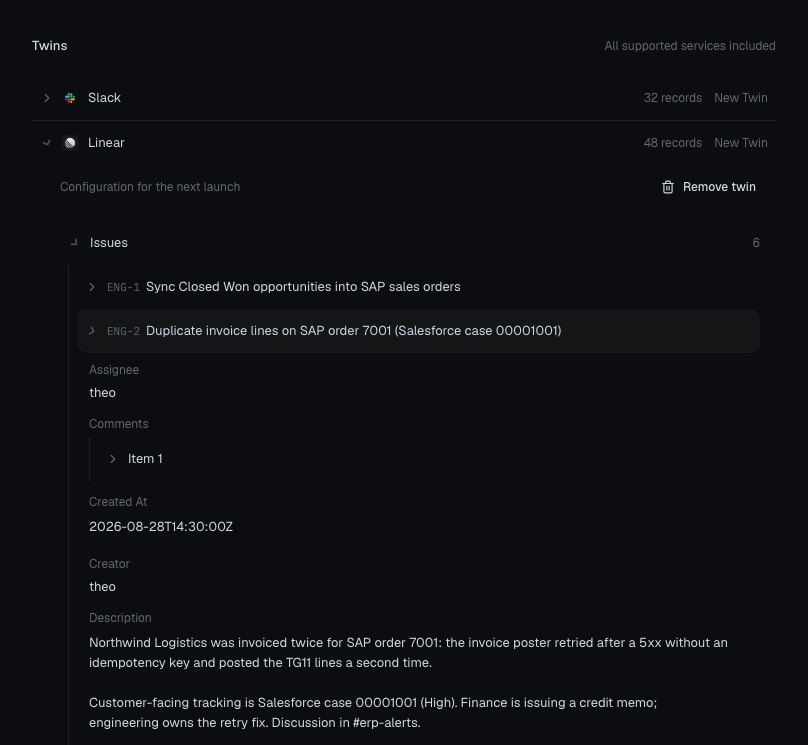
The draft's ENG-2 record links order 7001, case 00001001, and the finance handoff channel. Launching uses these records as the starting data.
Open the issue record at full size.Choose Launch world. In the world’s Twins tab, wait for every
service to show Running. Launching also saves the tasks as a suite.Checkpoint: open the world’s records and find Linear issue ENG-2.
Its incident description references order 7001, case 00001001,
and #erp-alerts—the same IDs used in the task.
2
Read the task and its checks
In the world, open Tasks → Open task suite. Select
Triage the duplicate invoice incident. The agent must:
Read ENG-2 and case 00001001 to confirm the incident.
Move ENG-2 to In Progress.
Post a new message in #erp-alerts containing this exact sentence:
ENG-2 is in progress for order 7001; case 00001001 remains open.
The two attached scorers check the issue change and the handoff message.
Both have a pass threshold of 1. The handoff check matches the exact
sentence, so a paraphrase can fail.The instruction also says not to close the case or claim a fix. Add a
separate scorer if you want either
constraint checked independently.
3
Run an evaluation
Open Backtests → New backtest and fill in the rows:
Row
Choose
Run
Name: Invoice triage smoke test. Mode: Suite.
Agents
Your configured agent version, for example billing-agent@1.0.0.
Test data
The suite created by the world. Its name ends in · Tasks.
Grading
Leave as is. The task’s attached scorers run automatically.
Environment
Leave as is. Each task already has its starting world.
Execution
Use 1 concurrent trial for the first run.
Choose Run backtest. Two tasks and one agent produce two trials.
Each gets a fresh world; changes made while exploring the dashboard do
not become the trial’s starting state.
4
Read the scores and evidence
When the run finishes, open Results → Cases and find the invoice task.
Switch to Raw trials and select its attempt. Read Scores for each
check’s value and threshold, then follow the trial’s Timeline.
You see
Next check
Both checks score 1
Confirm the Linear update and required Slack handoff in the recorded requests and changes.
Issue check 1, handoff check 0
Compare the Slack channel, record IDs, and message text with the required sentence. A zero does not by itself mean no message was sent.
Failure, missing scores, or a scorer error
Read the error first. Confirm execution and scoring completed before judging the agent’s behavior.
Checkpoint: you can identify the agent version, its task, each scorer
result, and the request or record change behind that result. A completed
run alone is not a passing test.
After the first run, register and configure an improved version, such as
billing-agent@1.1.0. Create a Compare evaluation, select both versions,
and choose Set baseline on 1.0.0. Keep the same task suite and starting
world. Two tasks and two versions produce four trials.Run an evaluation explains the comparison and result
views in detail.