

#erp-alerts. Scorers check the records, not the agent’s summary.
Words you’ll see
Before you run
- A launched world with tasks, or a task suite with saved scorer bindings and a starting environment. See Tasks and scorers.
- A registered, runnable agent. For a comparison, two versions such as
billing-agent@1.0.0and@1.1.0.
Configure the run
Open Backtests → New backtest and go through the six rows. For the example, select billing-agent@1.0.0 for a first Suite run. Once both versions are configured to execute, compare 1.0.0 with 1.1.0 on the same two-task suite: four planned trials.
Choose Run backtest. Chronicle freezes the suite’s current tasks and
scorers into a version and pins it to the run, so later edits don’t change
this result.
Limits: 8 agent versions and 200 trials per run.
Follow it
The run page shows status, progress, and a Trials table. The run continues on the server if you leave the page. Cancel stops queued trials; finished trials keep their results. Resolved configuration shows exactly what ran: suite version, environment, agent versions, sandbox image. Use it when a result surprises you.Read the results
Cases compares agents per task. For each case you see each version’s score and the difference. Don’t stop at the aggregate: a task with two required changes can score well on one and miss the other. Raw trials lists every attempt. Select one to see:- Instruction the agent received.
- Scores: each scorer’s value, weight, and threshold.
- Failure: present if the agent didn’t finish.
- Timeline: setup, agent execution, tool calls, and scoring, step by step.
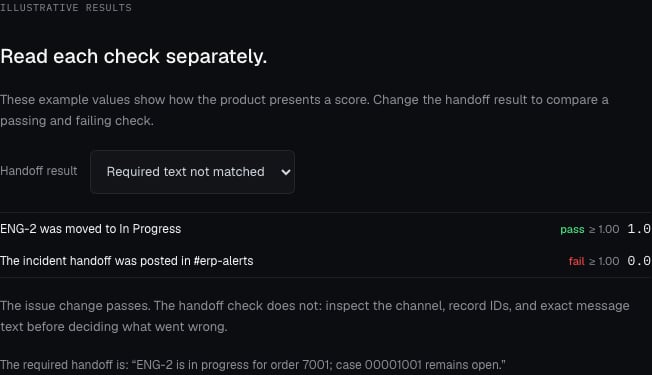
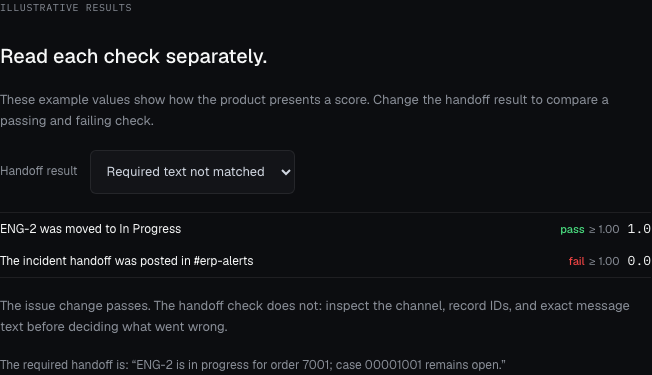
Illustrative scorer results: the issue-state check passes, while the exact handoff check fails. Each check has a threshold of 1.
Follow the invoice result
- In Cases, select Triage the duplicate invoice incident to compare the versions on that task.
- Switch to Raw trials and select the attempt for the version you are investigating. In Scores, inspect the issue-state and handoff checks separately; each starter check requires 1.
- In its Timeline, find the Linear update. Inspect the request’s target issue, response, and state change to In Progress.
- Find the Slack message creation in #erp-alerts. The starter scorer requires the message to contain this exact sentence:
ENG-2 is in progress for order 7001; case 00001001 remains open.A different channel, case number, or wording can explain a failed handoff check. The instruction to leave the case open is separate from these two checks; attach an independent guard if you need to verify that constraint. Checkpoint: you can explain each scorer result using a specific request or record change. Timeline shows how to separate execution problems from behavior failures.
Compare two versions
Register the improved agent as a new version, create a Compare run with both versions and the same suite, and set the old one as baseline. Look at each task’s scorers side by side. Change one thing at a time: the agent or the test, not both.When a run disappoints
Timeline
Follow a trial step by step.
Evaluations API
Launch and read runs from code.